# InsCipher Developer Portal
> Developer documentation for InsCipher API, integrations, and platform tools.
## Webhooks Overview
## Request Security & Validation
## State Stamp Wording Updated
## State Taxes and Fees Paid
## Transaction Import - Batch "Processed" or "Failed"
## Transaction Status Updated to "Filed"
## Microsoft Azure
## Okta
## SSO Overview
## Herald API
## Instanda
## System Integrations Overview
## Vertafore MGA Systems™
## Vertafore Surefyre™
## Import Policy Data
## Vertafore AMS360™: Overview
## Troubleshooting
## Vertafore AIM™: Create a Payment Batch
## Vertafore AIM™: Import Policy Data
## Vertafore AIM™: Overview
## Vertafore AIM™: Troubleshooting
## Insurity Submission Gateway (ISG)™
## Import Policy Data
## Concept One™ Overview
## Troubleshooting
## Import Policy Data
## Applied Epic™ Overview
## Troubleshooting
## Authentication
InsCipher's API supports two methods of authentication: **API Key** and **OAuth 2.0**. Both can be utilized independently or simultaneously depending upon your security requirements and integration needs.
### API Endpoint
#### Sandbox
The base URL for making requests with the InsCipher API is:
```
https://sandbox.inscipher.com/
```
#### Production
The base URL for making requests with the InsCipher API is:
```
https://surpluslines.inscipher.com/
```
:::warning
Requests not made over HTTPS will fail.
:::
### API Key Authentication
How you send your API key in the request will depend on the specific API. In either case you will do one of two things:
**Add the API key in the URL**
```
/api/v1/get-transaction-status.json?apikey=730fa8b31b.O58N60b2WzithSc8iNnR99FJFSk-&transaction_id=1121168
```
**Add the API key in the request header**
```bash
curl --request POST \
--url https://surpluslines.inscipher.com/api/tax-calculator/calculate-general-taxes \
--header 'accept: application/json' \
--header 'apiKey: 3d55487909.xLoZXOXW8dTPgXPPSpjhTyeJZsc-' \
--header 'content-type: application/json'
```
### Using OAuth 2.0 Authentication
OAuth 2.0 authentication is available for API use. It can be used alongside API key authentication — both methods can be used simultaneously and independently.
#### Requirements
To use OAuth 2.0 authentication, the following conditions must be met:
* You must have API access enabled (API key authentication must already be available to you).
* You must know your username and password to obtain an access token.
#### 1. Obtain Access Token
Send a `POST` request to `/api/oauth2/token` with your credentials:
```http
POST /api/oauth2/token
Content-Type: application/json
{
"grant_type": "password",
"username": "your_username",
"password": "your_password"
}
```
**Response**
The response will include:
| Field | Description |
| --------------- | ------------------------------------------ |
| `access_token` | Used for authenticated API requests |
| `refresh_token` | Used to obtain a new access token |
| `expires_in` | Token lifetime in seconds (typically 3600) |
#### 2. Refresh Token
When your access token expires (or shortly before), use your refresh token to obtain a new one:
```http
POST /api/oauth2/token
Content-Type: application/json
{
"grant_type": "refresh_token",
"refresh_token": "your_refresh_token"
}
```
**Response**
| Field | Description |
| -------------- | ---------------------------- |
| `access_token` | A new token for API requests |
:::note
* Refresh tokens are valid for 1 month.
* Once the refresh token expires, you must request a new access token using your username and password (see Step 1).
:::
#### 3. Access Protected Endpoints
Use the `access_token` in the `Authorization` header:
```http
GET /api/protected/resource
Authorization: Bearer your_access_token
```
Replace `your_access_token` with the token obtained in Step 1 or Step 2.
#### Error Handling
If you use an expired or invalid token, the API will return a `401 Unauthorized` response.
## Subscribe for Updates
## Connect® Clients
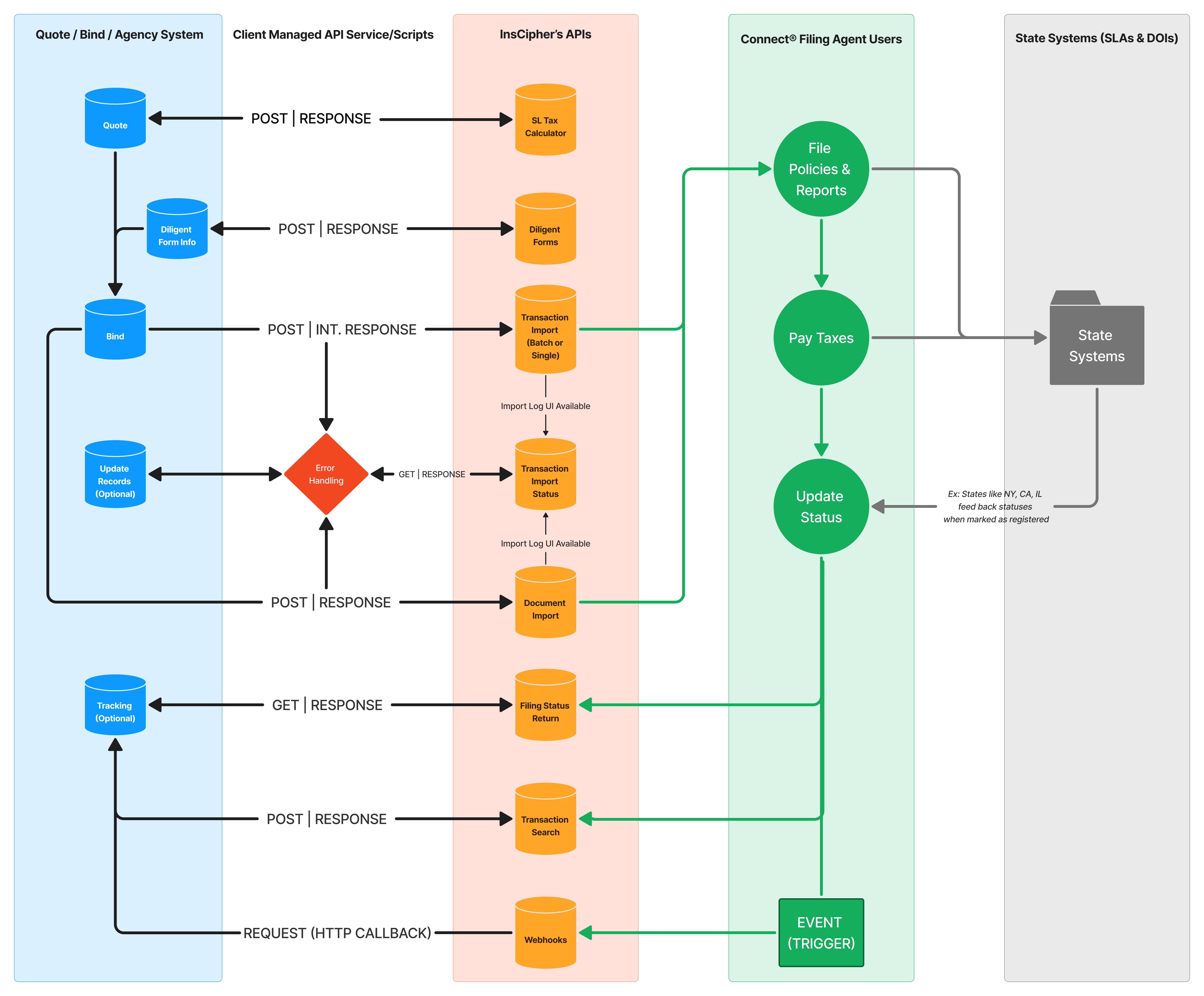
InsCipher offers the following APIs to programmatically POST and GET information related to the surplus lines tax filing process for Connect® users.
| Type(s) | API Name | Description | Use Cases / Benefits |
| ------------- | ------------------------------------------------------- | ---------------------------------------------------------------------------------------------------- | ---------------------------------------------------------------------------------------------------------------------------------------------------------------------------------------------------------------------------------------------------------------------------------------------------- |
| POST | [SL Tax Calculator](/api/tax-calculations) | Use InsCipher's tax calculator engine to get calculated SL Taxes | Submit basic policy details and get calculated SL Taxes and other state-specific taxes (stamping fees, service charges, municipal fees, etc.); get filing document requirements with links to download blank templates; get state stamp wording and informational state notes; fee restriction logic |
| POST | [Diligent Forms](/api/diligent-forms) | Use InsCipher's state templates to automatically fill out state diligent effort forms and affidavits | Submit policy data and diligent search results and receive back a fully or partially completed state diligent search form in all 50 states |
| POST | [Transaction Import](/api/transaction-import/overview) | Two methods — both import policy transaction details and documents into InsCipher | Import policy transactions and documents (optional); **Single** — returns an immediate success/fail response; **Batch** — returns an initial response if the batch was valid, then a second GET request retrieves the status of a processed batch |
| GET | [Batch Import Status](/api/transaction-import/overview) | Retrieve the import results for previously imported batches | Get the status of import batches with import errors such as tax calculation errors, missing fields, and missing documents |
| POST | [Document Import](/api/document-import) | Import policy documents and diligent effort affidavits separately | Import documents as a second step after policy transactions have been imported; get a response indicating whether the document was imported |
| GET | Transaction Status and Detail | Get filing and state tax payment status updates | Get filing status including assigned filing #, filing status, tax paid dates, SLA transaction IDs, etc. |
| HTTP Callback | [Webhooks](/webhooks/overview) | Get event callback detail | Get notified when certain transaction events occur |
## Filing Services® Clients
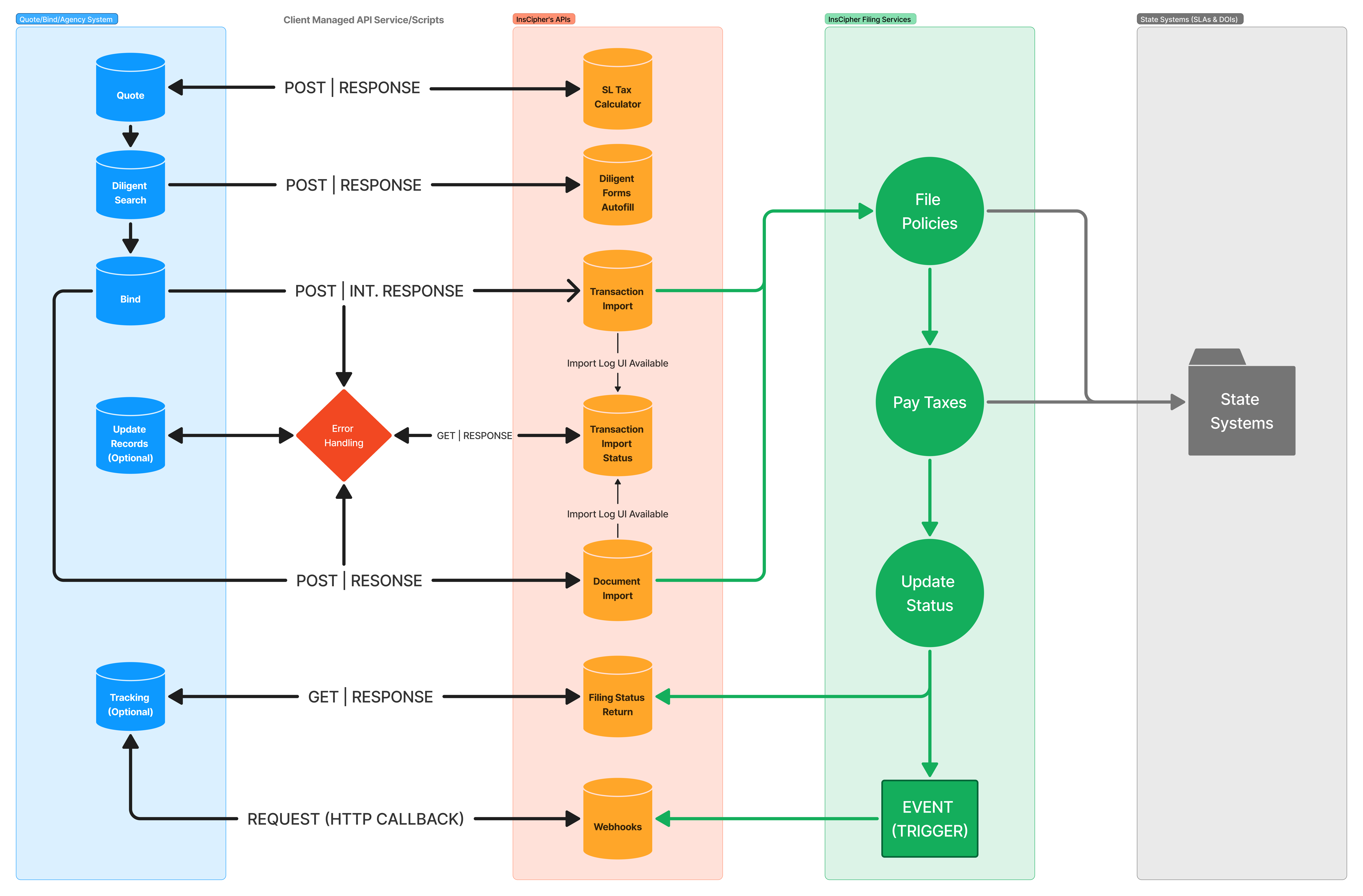
InsCipher offers the following APIs to programmatically POST and GET information related to the surplus lines tax filing process for Filing Services® users.
| Type(s) | API Name | Description | Use Cases / Benefits |
| ------------- | ------------------------------------------------------- | ---------------------------------------------------------------------------------------------------- | ---------------------------------------------------------------------------------------------------------------------------------------------------------------------------------------------------------------------------------------------------------------------------------------------------- |
| POST | [SL Tax Calculator](/api/tax-calculations) | Use InsCipher's tax calculator engine to get calculated SL Taxes | Submit basic policy details and get calculated SL Taxes and other state-specific taxes (stamping fees, service charges, municipal fees, etc.); get filing document requirements with links to download blank templates; get state stamp wording and informational state notes; fee restriction logic |
| POST | [Diligent Forms](/api/diligent-forms) | Use InsCipher's state templates to automatically fill out state diligent effort forms and affidavits | Submit policy data and diligent search results and receive back a fully or partially completed state diligent search form in all 50 states |
| POST | [Transaction Import](/api/transaction-import/overview) | Two methods — both import policy transaction details and documents into InsCipher | Import policy transactions and documents (optional); **Single** — returns an immediate success/fail response; **Batch** — returns an initial response if the batch was valid, then a second GET request retrieves the status of a processed batch |
| GET | [Batch Import Status](/api/transaction-import/overview) | Retrieve the import results for previously imported batches | Get the status of import batches with import errors such as tax calculation errors, missing fields, and missing documents |
| POST | [Document Import](/api/document-import) | Import policy documents and diligent effort affidavits separately | Import documents as a second step after policy transactions have been imported; get a response indicating whether the document was imported |
| GET | Transaction Status and Detail | Get filing and state tax payment status updates | Get filing status including assigned filing #, filing status, tax paid dates, SLA transaction IDs, etc. |
| HTTP Callback | [Webhooks](/webhooks/overview) | Get event callback detail | Get notified when certain transaction events occur |
## Introduction
Welcome to the InsCipher API! You can utilize our API to ensure surplus lines taxes are calculated accurately, diligent forms are filled out correctly, and policy transactions and documents can be imported seamlessly.
### Before You Get Started
:::warning[Active Account Required]
This guide is for current InsCipher customers with an active account. If you're new, explore our sales or demo options.
:::
1. Familiarize yourself with the relevant API guides and schemas.
2. Obtain an InsCipher API Key:
* **Connect clients:** Settings > User List & Settings, select Agency Admin, and click **'Get a new API Key'** under API & Batch Import Settings. One key serves all agencies in your account.
* **Filing Services clients:** Settings > API > Edit > API Information, click **'Get a new API Key'**.
* Alternatively, contact customer support for assistance.
3. Securely store your API key — it is visible only at generation.
:::danger[Keep Your API Key Safe]
Your API key is shown **once** at generation. Losing it requires generating a new one, which immediately **inactivates the old key**.
:::
### API Overview by Client Type
InsCipher primarily serves Connect and Filing Services clients, though standalone services — Tax Calculator, Diligent Forms API, and others — are also available. Always use the guides and schemas specific to your client type to prevent errors. Contact support for setup assistance.
#### Connect® Clients
Connect® is an enterprise solution for surplus lines tax filing management. Its APIs streamline data syncing between your systems and InsCipher.
[API solutions for Connect® Users →](/getting-started/introduction/connect-clients)
#### Filing Services® Clients
Filing Services® offers fully outsourced surplus lines reporting and tax payment. Its APIs streamline data syncing between your systems and InsCipher.
[API solutions for Filing Services® Users →](/getting-started/introduction/filing-services-clients)
### Understanding InsCipher Terminology
**Common Terms**
| Term | Definition |
| ------------------------ | ------------------------------------------------------------------------------------------------------------------------------------------- |
| **Transaction / Filing** | Policy data, invoice details, or an individual policy filing. |
| **Surplus Lines** | Non-admitted policies written on the Excess and Surplus Lines market. |
| **Documents** | Policy documents — e.g., declination pages, full policy docs, state diligent effort forms — accompanying transactions or stored separately. |
| **Line of Business** | The Line of Business / Coverage Code associated with the policy. |
| **Other Terms** | Specific field names are defined within each API guide. |
Carefully review field name definitions for accurate mapping.
### Rate Limits
:::warning[Rate Limit]
InsCipher API requests are limited to **10,000 requests per API key, per minute** across all public endpoints. Exceeding this limit returns a `429 Too Many Requests` response. Wait until the next minute to retry.
:::
### Errors
InsCipher uses standard HTTP response codes:
| Code | Meaning |
| ----- | -------------------------------------------------- |
| `2xx` | Success |
| `4xx` | Client-side error — invalid or missing information |
| `5xx` | Server-side error |
## Quick Start
## Field Requirements & Definitions
## Import Transactions
## Importing Documents
## Troubleshooting Imports
import { ScalarApiRef } from '../../components/ScalarApiRef'
## Diligent Forms
import { ScalarApiRef } from '../../components/ScalarApiRef'
## Document Import
import { ScalarApiRef } from '../../components/ScalarApiRef'
## Tax Calculations
InsCipher's Tax Calculator API simplifies compliance by automatically calculating complex, state-specific insurance taxes and fees for single or multi-line transactions. By providing basic details like location, dates, and coverage types, you instantly receive a complete line-by-line tax breakdown, the exact state stamp wording, transparent calculation rules, and a list of necessary filing documents to ensure accurate quoting and compliance.
* [API Endpoints](#api-endpoints)
* [Watch This First](#watch-this-first)
* [Getting Started](#getting-started)
* [FAQs](#faqs)
* [Tax Calculator API®](#how-to-use-this-request)
### API Endpoints
| Environment | URL | Method |
| -------------- | ------------------------------------------------------------------------------- | ------ |
| **Sandbox** | `https://sandbox.inscipher.com/api/tax-calculator/calculate-general-taxes` | POST |
| **Production** | `https://surpluslines.inscipher.com/api/tax-calculator/calculate-general-taxes` | POST |
:::warning
Requests not made over HTTPS will fail.
:::
### Watch This First
Before getting started, please watch this short walkthrough:
### Getting Started
#### Obtaining Access
InsCipher requires that you first obtain contracted permission to utilize our Tax Calculator API. If you are not already contracted, please reach out to [Sales](mailto\:info@inscipher.com) to start that process. If you are a client, please work with your InsCipher implementation specialist to get set up and obtain your API key.
#### Important Variables to Consider
To ensure accurate request construction, reference the following data tables for mapping codes and interpreting compliance deliverables:
* [Generic Lines of Business List](https://lookerstudio.google.com/u/0/reporting/f3c07407-ee34-4ec9-8a4a-f90b1d585e6b/page/p_4q66kh8crc) — Map the lines of business you write to our generic coverage list
* [Transaction Types List](https://lookerstudio.google.com/u/0/reporting/41dce747-d045-4e1f-884d-07d23581a90a/page/p_83noca0k9c) — Map your transaction types to our list
* [Document Requirements](https://lookerstudio.google.com/u/0/reporting/f3c07407-ee34-4ec9-8a4a-f90b1d585e6b/page/p_otc1uchjqc) — State-specific policy documents required to bind coverage
* [State Stamp Wording](https://lookerstudio.google.com/s/pruKt8r4i3Q)
* [Unique State Tax Titles](https://lookerstudio.google.com/u/0/reporting/f3c07407-ee34-4ec9-8a4a-f90b1d585e6b/page/p_xv4ud8gjqc)
##### Tax Calculation Category
| Category | Field Value |
| ------------------------ | --------------- |
| Non-Admitted (Default) | `"admitted": 0` |
| Admitted (Kentucky Only) | `"admitted": 1` |
### FAQs
Can I calculate taxes for future policy effective dates?
State taxes and fees can change at any time. However, most states update taxes in the fall (if they update taxes at all). InsCipher maintains at least one full calendar year of tax rates at a time. Tax rules are updated for the following year by the InsCipher Compliance Team (typically finalized Sept/Oct). Because future rates are unpredictable, best practice is to submit transactions within the current calendar year.
How do I calculate taxes on endorsements?
For endorsements, submit the **difference in premium** (not the new total).
* **APE** (Additional Premium Endorsement): Submit the positive difference (e.g., original $500, new $650, submit $150).
* **RPE** (Return Premium Endorsement): Submit the positive difference. The system recognizes the RPE transaction type and applies it as a credit automatically.
How are Documents returned via this endpoint?
* **Templates:** Links to download blank state forms.
* **Requirements:** Informational flags indicating if a specific document is required for submission.
How do Generic Lines of Business Import Codes work?
Use our [Generic Import Codes](https://lookerstudio.google.com/u/0/reporting/f3c07407-ee34-4ec9-8a4a-f90b1d585e6b/page/p_4q66kh8crc) (GEN-XXXX) to simplify line of business mapping to state-specific codes. Some states have line-of-business-specific tax rates (not all). Custom mapping adjustments can be requested during implementation.
How should I understand tax titles?
In some states, rather than having a unique field name, we have chosen to repurpose field names for specific fees. Refer to the [Unique State Tax Titles](https://lookerstudio.google.com/u/0/reporting/f3c07407-ee34-4ec9-8a4a-f90b1d585e6b/page/p_xv4ud8gjqc) datasheet for definitions.
Do states restrict broker or carrier fees?
Certain states restrict fees. In the JSON response, InsCipher will automatically adjust the fee amounts where fee restrictions apply. For a summary, refer to the [Fee Restrictions Guide](https://lookerstudio.google.com/u/0/reporting/f3c07407-ee34-4ec9-8a4a-f90b1d585e6b/page/p_tz4ybpmhzc).
What classifies as 'Taxable Fees'?
InsCipher will determine whether or not a specific broker or carrier fee is taxable and return the calculated amount in the JSON response. Map the fees you charge to the insured (in excess of premium) to either **Broker Fees** \[`agency_fee`] or **Carrier Fees** \[`inspection_fee`]. For a summary of taxable fees, please refer to the [Taxable Fees Guide](https://lookerstudio.google.com/u/0/reporting/f3c07407-ee34-4ec9-8a4a-f90b1d585e6b/page/p_f7qdebf6sd).
***
### How to Use This Request
import { ScalarApiRef } from '../../components/ScalarApiRef'
## Transaction Search
Introduction Introduction Introduction Introduction Introduction Introduction Introduction Introduction Introduction Introduction
Introduction Introduction Introduction Introduction Introduction Introduction Introduction Introduction Introduction Introduction
Introduction Introduction Introduction Introduction Introduction Introduction Introduction Introduction Introduction Introduction
import { ScalarApiRef } from '../../components/ScalarApiRef'
## Transaction Search — Interactive
import { ScalarApiRef } from '../../components/ScalarApiRef'
## Transaction Search
Return a collection of policy transactions previously imported into InsCipher by specific date parameters.
### Introduction
This endpoint allows for the retrieval of transactions by one or more date-based body parameters, including `date_filed`, `policy_effective_date`, and `transaction_effective_date`. Pagination can be controlled via the `page` URL parameter in the format `page=1`, where `1` has no limit.
### Endpoint
| | |
| ---------- | ---------------------------------------------------------------------- |
| **Method** | `POST` |
| **URL** | `https://surpluslines.inscipher.com/api/v1/search-transactions?page=1` |
### Parameters
| Parameter | Description | Requirement |
| --------- | ------------------------------------------------------------- | ----------- |
| `apikey` | This unique key must be included in the header of the request | Required |
### Request Field Descriptions
| Field Name | Field Description / Notes |
| ---------------------------- | --------------------------------------------------------------------------------------------------------------------------- |
| `date_filed` | Date the policy was filed (if applicable). Format: `yyyy-mm-dd` UTC timezone. |
| `policy_effective_date` | Policy effective date. Format: `yyyy-mm-dd` UTC timezone. |
| `transaction_effective_date` | Transaction effective date (same as policy effective date for new and renewal policies). Format: `yyyy-mm-dd` UTC timezone. |
:::note[Date Filter Behavior]
For all date fields, the API accepts date filters where the `from` date is earlier than the `to` date (e.g., `from: 2026-01-01`, `to: 2027-01-01`).
If the request body includes duplicate keys — for example `transaction_effective_date` appearing twice — the API accepts the request but uses only the **last** occurrence, discarding the first.
:::
### Try It
## Transaction Search
Return a collection of policy transactions previously imported into InsCipher by specific date parameters.
### Introduction
This endpoint allows for the retrieval of transactions by one or more date-based body parameters, including `date_filed`, `policy_effective_date`, and `transaction_effective_date`. Pagination can be controlled via the `page` URL parameter in the format `page=1`, where `1` has no limit.
### Endpoint
| | |
| ---------- | ---------------------------------------------------------------------- |
| **Method** | `POST` |
| **URL** | `https://surpluslines.inscipher.com/api/v1/search-transactions?page=1` |
### Parameters
| Parameter | Description | Requirement |
| --------- | ------------------------------------------------------------- | ----------- |
| `apikey` | This unique key must be included in the header of the request | Required |
### Request Field Descriptions
| Field Name | Field Description / Notes |
| ---------------------------- | --------------------------------------------------------------------------------------------------------------------------- |
| `date_filed` | Date the policy was filed (if applicable). Format: `yyyy-mm-dd` UTC timezone. |
| `policy_effective_date` | Policy effective date. Format: `yyyy-mm-dd` UTC timezone. |
| `transaction_effective_date` | Transaction effective date (same as policy effective date for new and renewal policies). Format: `yyyy-mm-dd` UTC timezone. |
:::note[Date Filter Behavior]
For all date fields, the API accepts date filters where the `from` date is earlier than the `to` date (e.g., `from: 2026-01-01`, `to: 2027-01-01`).
If the request body includes duplicate keys — for example `transaction_effective_date` appearing twice — the API accepts the request but uses only the **last** occurrence, discarding the first.
:::
### Sample Request / Response
 InsCipher offers the following APIs to programmatically POST and GET information related to the surplus lines tax filing process for Connect® users.
 | Type(s) | API Name | Description | Use Cases / Benefits |
| ------------- | ------------------------------------------------------- | ---------------------------------------------------------------------------------------------------- | ---------------------------------------------------------------------------------------------------------------------------------------------------------------------------------------------------------------------------------------------------------------------------------------------------- |
| POST | [SL Tax Calculator](/api/tax-calculations) | Use InsCipher's tax calculator engine to get calculated SL Taxes | Submit basic policy details and get calculated SL Taxes and other state-specific taxes (stamping fees, service charges, municipal fees, etc.); get filing document requirements with links to download blank templates; get state stamp wording and informational state notes; fee restriction logic |
| POST | [Diligent Forms](/api/diligent-forms) | Use InsCipher's state templates to automatically fill out state diligent effort forms and affidavits | Submit policy data and diligent search results and receive back a fully or partially completed state diligent search form in all 50 states |
| POST | [Transaction Import](/api/transaction-import/overview) | Two methods — both import policy transaction details and documents into InsCipher | Import policy transactions and documents (optional); **Single** — returns an immediate success/fail response; **Batch** — returns an initial response if the batch was valid, then a second GET request retrieves the status of a processed batch |
| GET | [Batch Import Status](/api/transaction-import/overview) | Retrieve the import results for previously imported batches | Get the status of import batches with import errors such as tax calculation errors, missing fields, and missing documents |
| POST | [Document Import](/api/document-import) | Import policy documents and diligent effort affidavits separately | Import documents as a second step after policy transactions have been imported; get a response indicating whether the document was imported |
| GET | Transaction Status and Detail | Get filing and state tax payment status updates | Get filing status including assigned filing #, filing status, tax paid dates, SLA transaction IDs, etc. |
| HTTP Callback | [Webhooks](/webhooks/overview) | Get event callback detail | Get notified when certain transaction events occur |
## Filing Services® Clients
| Type(s) | API Name | Description | Use Cases / Benefits |
| ------------- | ------------------------------------------------------- | ---------------------------------------------------------------------------------------------------- | ---------------------------------------------------------------------------------------------------------------------------------------------------------------------------------------------------------------------------------------------------------------------------------------------------- |
| POST | [SL Tax Calculator](/api/tax-calculations) | Use InsCipher's tax calculator engine to get calculated SL Taxes | Submit basic policy details and get calculated SL Taxes and other state-specific taxes (stamping fees, service charges, municipal fees, etc.); get filing document requirements with links to download blank templates; get state stamp wording and informational state notes; fee restriction logic |
| POST | [Diligent Forms](/api/diligent-forms) | Use InsCipher's state templates to automatically fill out state diligent effort forms and affidavits | Submit policy data and diligent search results and receive back a fully or partially completed state diligent search form in all 50 states |
| POST | [Transaction Import](/api/transaction-import/overview) | Two methods — both import policy transaction details and documents into InsCipher | Import policy transactions and documents (optional); **Single** — returns an immediate success/fail response; **Batch** — returns an initial response if the batch was valid, then a second GET request retrieves the status of a processed batch |
| GET | [Batch Import Status](/api/transaction-import/overview) | Retrieve the import results for previously imported batches | Get the status of import batches with import errors such as tax calculation errors, missing fields, and missing documents |
| POST | [Document Import](/api/document-import) | Import policy documents and diligent effort affidavits separately | Import documents as a second step after policy transactions have been imported; get a response indicating whether the document was imported |
| GET | Transaction Status and Detail | Get filing and state tax payment status updates | Get filing status including assigned filing #, filing status, tax paid dates, SLA transaction IDs, etc. |
| HTTP Callback | [Webhooks](/webhooks/overview) | Get event callback detail | Get notified when certain transaction events occur |
## Filing Services® Clients
 InsCipher offers the following APIs to programmatically POST and GET information related to the surplus lines tax filing process for Filing Services® users.
 | Type(s) | API Name | Description | Use Cases / Benefits |
| ------------- | ------------------------------------------------------- | ---------------------------------------------------------------------------------------------------- | ---------------------------------------------------------------------------------------------------------------------------------------------------------------------------------------------------------------------------------------------------------------------------------------------------- |
| POST | [SL Tax Calculator](/api/tax-calculations) | Use InsCipher's tax calculator engine to get calculated SL Taxes | Submit basic policy details and get calculated SL Taxes and other state-specific taxes (stamping fees, service charges, municipal fees, etc.); get filing document requirements with links to download blank templates; get state stamp wording and informational state notes; fee restriction logic |
| POST | [Diligent Forms](/api/diligent-forms) | Use InsCipher's state templates to automatically fill out state diligent effort forms and affidavits | Submit policy data and diligent search results and receive back a fully or partially completed state diligent search form in all 50 states |
| POST | [Transaction Import](/api/transaction-import/overview) | Two methods — both import policy transaction details and documents into InsCipher | Import policy transactions and documents (optional); **Single** — returns an immediate success/fail response; **Batch** — returns an initial response if the batch was valid, then a second GET request retrieves the status of a processed batch |
| GET | [Batch Import Status](/api/transaction-import/overview) | Retrieve the import results for previously imported batches | Get the status of import batches with import errors such as tax calculation errors, missing fields, and missing documents |
| POST | [Document Import](/api/document-import) | Import policy documents and diligent effort affidavits separately | Import documents as a second step after policy transactions have been imported; get a response indicating whether the document was imported |
| GET | Transaction Status and Detail | Get filing and state tax payment status updates | Get filing status including assigned filing #, filing status, tax paid dates, SLA transaction IDs, etc. |
| HTTP Callback | [Webhooks](/webhooks/overview) | Get event callback detail | Get notified when certain transaction events occur |
## Introduction
Welcome to the InsCipher API! You can utilize our API to ensure surplus lines taxes are calculated accurately, diligent forms are filled out correctly, and policy transactions and documents can be imported seamlessly.
### Before You Get Started
:::warning[Active Account Required]
This guide is for current InsCipher customers with an active account. If you're new, explore our sales or demo options.
:::
1. Familiarize yourself with the relevant API guides and schemas.
2. Obtain an InsCipher API Key:
* **Connect clients:** Settings > User List & Settings, select Agency Admin, and click **'Get a new API Key'** under API & Batch Import Settings. One key serves all agencies in your account.
* **Filing Services clients:** Settings > API > Edit > API Information, click **'Get a new API Key'**.
* Alternatively, contact customer support for assistance.
3. Securely store your API key — it is visible only at generation.
:::danger[Keep Your API Key Safe]
Your API key is shown **once** at generation. Losing it requires generating a new one, which immediately **inactivates the old key**.
:::
### API Overview by Client Type
InsCipher primarily serves Connect and Filing Services clients, though standalone services — Tax Calculator, Diligent Forms API, and others — are also available. Always use the guides and schemas specific to your client type to prevent errors. Contact support for setup assistance.
#### Connect® Clients
Connect® is an enterprise solution for surplus lines tax filing management. Its APIs streamline data syncing between your systems and InsCipher.
[API solutions for Connect® Users →](/getting-started/introduction/connect-clients)
#### Filing Services® Clients
Filing Services® offers fully outsourced surplus lines reporting and tax payment. Its APIs streamline data syncing between your systems and InsCipher.
[API solutions for Filing Services® Users →](/getting-started/introduction/filing-services-clients)
### Understanding InsCipher Terminology
**Common Terms**
| Term | Definition |
| ------------------------ | ------------------------------------------------------------------------------------------------------------------------------------------- |
| **Transaction / Filing** | Policy data, invoice details, or an individual policy filing. |
| **Surplus Lines** | Non-admitted policies written on the Excess and Surplus Lines market. |
| **Documents** | Policy documents — e.g., declination pages, full policy docs, state diligent effort forms — accompanying transactions or stored separately. |
| **Line of Business** | The Line of Business / Coverage Code associated with the policy. |
| **Other Terms** | Specific field names are defined within each API guide. |
Carefully review field name definitions for accurate mapping.
### Rate Limits
:::warning[Rate Limit]
InsCipher API requests are limited to **10,000 requests per API key, per minute** across all public endpoints. Exceeding this limit returns a `429 Too Many Requests` response. Wait until the next minute to retry.
:::
### Errors
InsCipher uses standard HTTP response codes:
| Code | Meaning |
| ----- | -------------------------------------------------- |
| `2xx` | Success |
| `4xx` | Client-side error — invalid or missing information |
| `5xx` | Server-side error |
## Quick Start
## Field Requirements & Definitions
## Import Transactions
## Importing Documents
## Troubleshooting Imports
import { ScalarApiRef } from '../../components/ScalarApiRef'
## Diligent Forms
| Type(s) | API Name | Description | Use Cases / Benefits |
| ------------- | ------------------------------------------------------- | ---------------------------------------------------------------------------------------------------- | ---------------------------------------------------------------------------------------------------------------------------------------------------------------------------------------------------------------------------------------------------------------------------------------------------- |
| POST | [SL Tax Calculator](/api/tax-calculations) | Use InsCipher's tax calculator engine to get calculated SL Taxes | Submit basic policy details and get calculated SL Taxes and other state-specific taxes (stamping fees, service charges, municipal fees, etc.); get filing document requirements with links to download blank templates; get state stamp wording and informational state notes; fee restriction logic |
| POST | [Diligent Forms](/api/diligent-forms) | Use InsCipher's state templates to automatically fill out state diligent effort forms and affidavits | Submit policy data and diligent search results and receive back a fully or partially completed state diligent search form in all 50 states |
| POST | [Transaction Import](/api/transaction-import/overview) | Two methods — both import policy transaction details and documents into InsCipher | Import policy transactions and documents (optional); **Single** — returns an immediate success/fail response; **Batch** — returns an initial response if the batch was valid, then a second GET request retrieves the status of a processed batch |
| GET | [Batch Import Status](/api/transaction-import/overview) | Retrieve the import results for previously imported batches | Get the status of import batches with import errors such as tax calculation errors, missing fields, and missing documents |
| POST | [Document Import](/api/document-import) | Import policy documents and diligent effort affidavits separately | Import documents as a second step after policy transactions have been imported; get a response indicating whether the document was imported |
| GET | Transaction Status and Detail | Get filing and state tax payment status updates | Get filing status including assigned filing #, filing status, tax paid dates, SLA transaction IDs, etc. |
| HTTP Callback | [Webhooks](/webhooks/overview) | Get event callback detail | Get notified when certain transaction events occur |
## Introduction
Welcome to the InsCipher API! You can utilize our API to ensure surplus lines taxes are calculated accurately, diligent forms are filled out correctly, and policy transactions and documents can be imported seamlessly.
### Before You Get Started
:::warning[Active Account Required]
This guide is for current InsCipher customers with an active account. If you're new, explore our sales or demo options.
:::
1. Familiarize yourself with the relevant API guides and schemas.
2. Obtain an InsCipher API Key:
* **Connect clients:** Settings > User List & Settings, select Agency Admin, and click **'Get a new API Key'** under API & Batch Import Settings. One key serves all agencies in your account.
* **Filing Services clients:** Settings > API > Edit > API Information, click **'Get a new API Key'**.
* Alternatively, contact customer support for assistance.
3. Securely store your API key — it is visible only at generation.
:::danger[Keep Your API Key Safe]
Your API key is shown **once** at generation. Losing it requires generating a new one, which immediately **inactivates the old key**.
:::
### API Overview by Client Type
InsCipher primarily serves Connect and Filing Services clients, though standalone services — Tax Calculator, Diligent Forms API, and others — are also available. Always use the guides and schemas specific to your client type to prevent errors. Contact support for setup assistance.
#### Connect® Clients
Connect® is an enterprise solution for surplus lines tax filing management. Its APIs streamline data syncing between your systems and InsCipher.
[API solutions for Connect® Users →](/getting-started/introduction/connect-clients)
#### Filing Services® Clients
Filing Services® offers fully outsourced surplus lines reporting and tax payment. Its APIs streamline data syncing between your systems and InsCipher.
[API solutions for Filing Services® Users →](/getting-started/introduction/filing-services-clients)
### Understanding InsCipher Terminology
**Common Terms**
| Term | Definition |
| ------------------------ | ------------------------------------------------------------------------------------------------------------------------------------------- |
| **Transaction / Filing** | Policy data, invoice details, or an individual policy filing. |
| **Surplus Lines** | Non-admitted policies written on the Excess and Surplus Lines market. |
| **Documents** | Policy documents — e.g., declination pages, full policy docs, state diligent effort forms — accompanying transactions or stored separately. |
| **Line of Business** | The Line of Business / Coverage Code associated with the policy. |
| **Other Terms** | Specific field names are defined within each API guide. |
Carefully review field name definitions for accurate mapping.
### Rate Limits
:::warning[Rate Limit]
InsCipher API requests are limited to **10,000 requests per API key, per minute** across all public endpoints. Exceeding this limit returns a `429 Too Many Requests` response. Wait until the next minute to retry.
:::
### Errors
InsCipher uses standard HTTP response codes:
| Code | Meaning |
| ----- | -------------------------------------------------- |
| `2xx` | Success |
| `4xx` | Client-side error — invalid or missing information |
| `5xx` | Server-side error |
## Quick Start
## Field Requirements & Definitions
## Import Transactions
## Importing Documents
## Troubleshooting Imports
import { ScalarApiRef } from '../../components/ScalarApiRef'
## Diligent Forms